Add videos
Save videos from YouTube to any folder in one click and choose where they go: top, bottom, or play now.
Stop losing saves in tabs and notes. Queue what you love, organize in folders, and watch without breaking focus.
We’re opening access in waves. Join the waitlist to get early access.
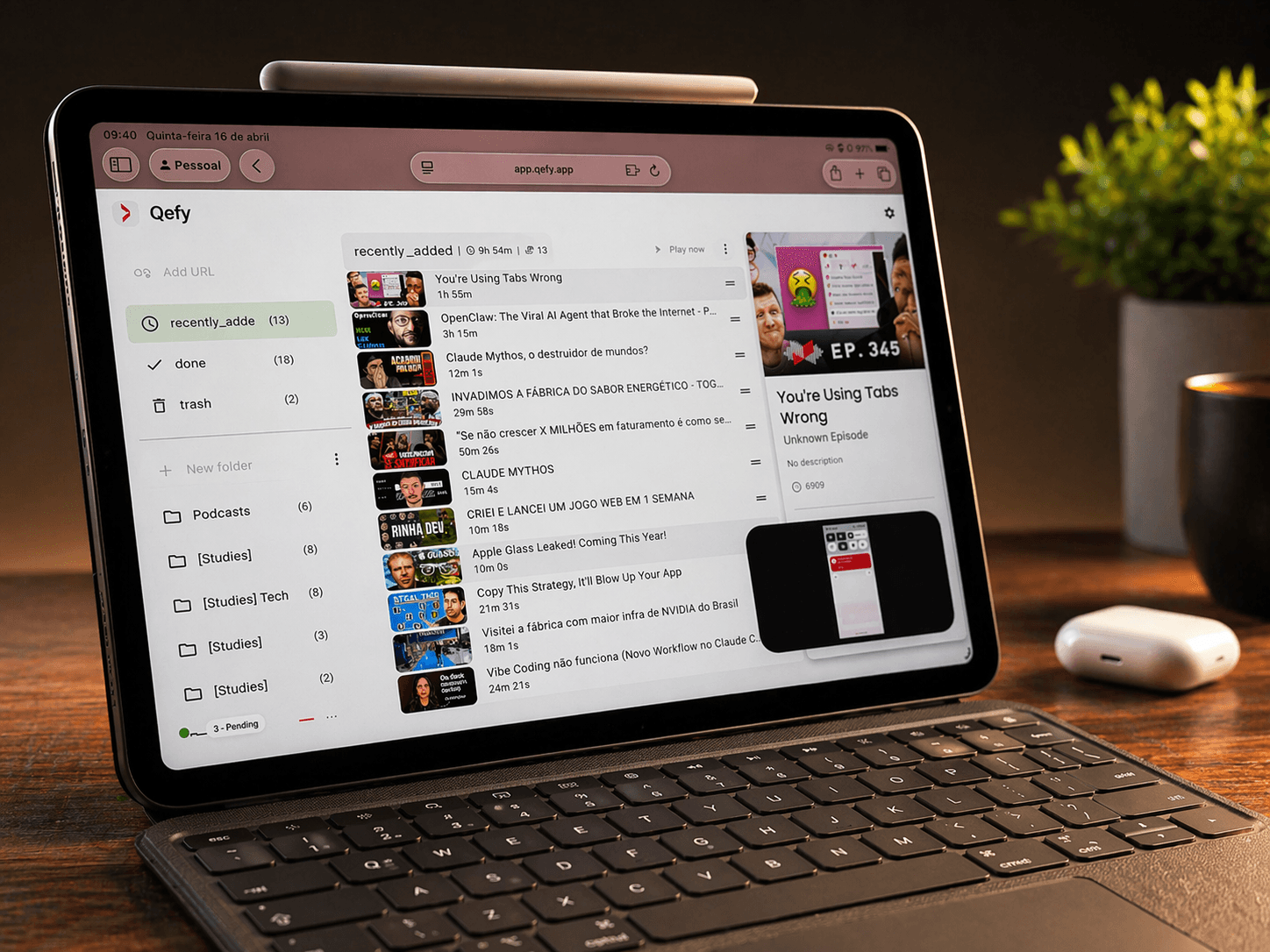

QueueFy was built with attention to detail and a focus on practical media workflows.
Join the waitlist for early access as new capabilities roll out.
The universal media queue for the internet.
Autoplay videos, music, podcasts and content across platforms in one continuous experience.
Save videos from YouTube to any folder in one click and choose where they go: top, bottom, or play now.
Desktop, phone, or tablet—the same folders and queue follow you, so you never start from scratch.
Never lose track of the videos, tutorials, or podcast episodes you saved for later. Folders keep everything one search away.
Save and control playback from the page you're on—less copy-paste and fewer lost moments.
Let your queue play through automatically—no manual “next” clicks and no tab-hopping between videos.
Explore the full feature list when you're ready to go deeper.
The operating system for online media.
One queue for YouTube, Spotify, Netflix and everything you consume online.
QueueFy FEATURES
Made with attention to detail to make your organization easier.
Check some of our features below:
Centralize everything in the QueueFy App: this is where you organize your media, control playback, add new items, and manage settings like speed, themes, and folder rules. Keep autoplay flowing, sync across devices, clean your backlog, and jump back in exactly where you stopped.
Browse tables, queues, and saved items in one place—built for fast scanning, sorting, and reordering without losing context.
Centralize everything in the QueueFy App: this is where you organize your media, control playback, add new items, and manage settings like speed, themes, and folder rules. Keep autoplay flowing, sync across devices, clean your backlog, and jump back in exactly where you stopped.
Browse tables, queues, and saved items in one place—built for fast scanning, sorting, and reordering without losing context.
Stop drowning in tabs.
Turn the entire internet into one seamless media experience.
Save videos, podcasts, courses, and more in one click—from the extension or app. Everything lands in one queue instead of ten open tabs.
Sort into folders you actually use. When you want help, AI can suggest where things go—and Clean my mess helps you batch-triage while you stay in control.
Open QueueFy on desktop or mobile and keep the same queue. Save fast with the extension; organize and play in the app—your list stays with you.
Autoplay across the internet.
Queue anything. Watch continuously. Never lose your flow.
FAQ
Yes—QueueFy includes a generous free plan so you can try the core workflows at no cost. For the complete experience, choose one of our paid plans. Compare all plans.
Yes—QueueFy is deeply integrated with YouTube. With the browser extension, you can add videos to your queue straight from thumbnails and search results, without juggling extra tabs. While you watch, the in-page mini-app keeps playback and queue controls handy. You can also sync QueueFy folders with YouTube playlists so the same lists open on a smart TV, console, or anywhere YouTube runs.
Available today: the QueueFy web app in any modern browser on desktop, tablet, and phone, plus the Chromium extension on Chrome, Brave, Edge, and Firefox (desktop). Install the web app as a PWA on mobile for a home-screen shortcut. Native iOS and Android apps are in active development—CarPlay and offline playback are targeted for Q3 2026. Until the native apps ship, the web app is the best way to use QueueFy on your phone. For the fullest experience on desktop, use the web app together with the extension.
QueueFy does not bypass DRM or platform restrictions. Some services cannot play inside a generic web embed—and that is expected. With the QueueFy extension in your Chromium browser, playback opens on the real site in a normal tab (Netflix, Disney+, and similar). The extension manages your tabs and queue while you watch on the platform itself, so DRM-protected sites stay fully compatible.
Yes. QueueFy is built for bookmarking and managing media while keeping your watch-or-listen flow—but you can save any link or URL QueueFy accepts. We do our best to extract metadata and open the right page when you are ready to use an item.
It scans your open YouTube tabs and uses AI (when enabled) to suggest folders before saving. You review each item and confirm—QueueFy never closes tabs without your permission.
Yes—you can save, organize, and manage your queue entirely from the web app; the extension is optional. The complete experience—especially autoplay that moves you between items and sites the way QueueFy intends, plus in-page playback and progress tracking tied to the extension—is only available with the Chromium extension. On web-only, choosing play typically opens the provider (for example YouTube) in a new tab instead of the unified in-page player, so you don't get the same cross-site autoplay or extension-side tracking behavior.
Yes—for organizing your library. QueueFy is offline-first: you can add items, edit folders, and keep structuring your queue on flaky or missing internet, then everything syncs when you are back online so your flow is not interrupted mid-session. Playback is different: QueueFy does not download videos or audio for offline viewing or listening yet, so streaming providers (for example YouTube) still need a working connection. True offline media downloads are planned for the future, but they are not available today.
Yes. Connect your YouTube account and QueueFy can pull in your existing playlists as folders, letting you manage them inside QueueFy and sync changes back to YouTube.